
Contributor Guidelines#
Introduction#
ICON is simultaneously developed in several repositories. There is a primary repository icon and several secondary ones: icon-nwp, icon-mpim, etc. The default branch of the primary repository is also known as the release candidate (RC) of ICON.
Communication#
Use issues of the relevant ICON repository (fork) as a tool to communicate, track, and obtain information related to work items. Create an issue to report a bug you found, request a feature that needs to be implemented, or to discuss and coordinate with others on a particular topic. Issues can also be employed to address other work items, such as tracking the porting of a module to a different programming language or collecting information regarding an unexpected simulation result.
Note: Prefer GitLab communication over private emails or messages to ensure information is searchable and accessible to a larger audience.
Note: Avoid using tasks, as they add an extra level of hierarchy. To keep things simple, use issues only.
Creating Issues#
Choose a template (e.g.
bug-report,feature-request) if available before writing an issue description.Present issues clearly and include all relevant information so others can easily understand them.
Each issue should focus on one actionable task (e.g., one bug or feature request). If it becomes too lengthy or complex, break it into smaller issues and link them to the original one.
Always assign an issue to someone and communicate this clearly. Mention developers as needed, but keep it to a minimum.
Apply as many relevant labels as possible. They help in classifying the issue (e.g.
Bug,Feature request,Discussion) and provide additional context like machines used (e.g.,Levante,LUMI), parts of ICON affected (e.g.Ocean,CI), or projects involved (e.g.NextGEMS,WarmWorld). Feel free to create new labels if the right ones don’t exist.
Note: Issues will be marked as
Staleafter two months of inactivity. Maintainers may close issues stalled for longer than two months. If the issue is still relevant, you’re welcome to reopen it with a description following these guidelines.
Code Contributions#
Please follow the ICON development workflow decription. In that process your contributions will be evaluated according to the Reviewing Guidelines.
The following sections should provide basic rules for coding and later merge request (MR), but are not meant to replace the above documents.
Coding Style#
We use pre-commit hooks to maintain a set of formatting and linting rules. Although there is a CI job that runs for each merge request and checks whether the contribution does not break the rules, we recommend registering the hooks in your local repository clone. This way, each commit undergoes the formatting and linking checks automatically.
We recommend installing pre-commit to a separate Python virtual environment using pip. For example, the following commands install the tool to the user’s home directory:
python3 -m venv ~/pre-commit
~/pre-commit/bin/python3 -m pip install --upgrade pip
~/pre-commit/bin/python3 -m pip install pre-commit
You can now switch to the root of the repository and run the following command to register the hooks specified in .pre-commit-config.yaml:
cd icon
~/pre-commit/bin/pre-commit install
From now on, each commit you make will be checked by a set of formatters and linters. Normally, the formatting tools are configured to modify the files in place. This means that if they fail, all you need to do is to accept the suggested changes and commit them:
git add .
git commit
Note that you will need to register the hooks for each fresh clone of the repository. Alternatively, you can follow these instructions to configure git to register hooks automatically for each new clone of a repository that declares them.
General Coding Rules#
Blend-in with whatever you change or add to the ICON. Possibly even improve the code readability. As a rule of thumb, the coding style of new code should be similar to other code in the corresponding module. See [1] for basic guidelines.
Extensive code formatting should be done in dedicated merge requests.
Avoid adding comments about future actions. For example,
! Delete the subroutines below once the module is validatedIf necessary, include a reference to an issue that provides the progress status (e.g., an issue on the validation of the aforementioned module).
Do not add commented-out code to the codebase, as it produces maintenance and development overhead.
Merge Requests#
Choose a template (e.g.
nwp-feature) if available before writing a merge request description.Make the merge request title concise (titles become the first line of the commit message when the merge requests are accepted, together with a repository-specific prefix, e.g.
[mpim],[nwp], etc., max. length 80 chars).Please, adhere to the following recommendations for the merge requests short descriptions, which will become part of the commit message when the merge request is accepted:
use simple English in the active form (e.g. this implements A, updates B);
avoid special Markdown symbols and prefer plain ASCII, the message should read well in the terminal;
keep it short (excluding details, descriptions are appended to the merge request commit message);
do not reference issues and merge requests unless necessary (if referencing is necessary, make sure the reference contains the name and the namespace of the respective repository, e.g.
icon/icon#<issue-id>andicon/icon!<mr-id>);break the lines to make them no longer than 80 characters.
Note: The recommendations above apply to the short descriptions only. There are no restrictions for the detailed section.
The lists of co-authors in merge requests are generated automatically based on the authorship of the commits in the source branches. Please ensure that the commits in the source branch have the correct authorship with the correct email addresses (they can be automatically-generated private commit emails). If some commits have the wrong authorship, you can provide the list of co-authors using the following format:
Co-authored-by: First-Name Second-Name <email.address@example.de>
Co-authored-by: Another Name <another.address@example.com>
Note: Tagging issues shows activity and prevents them from becoming
Stale. WritingCloses #<issue-ID>in a merge request description automatically closes the issue when the request is merged.
Documentation#
The ICON documentation is automatically generated from the content of the subdirectory doc/www/. Please consider extending and updating the documentation with each merge request.
Code Contributions for Ragnarok#
Several components of the AES physics are currently being ported to C++/Kokkos to enhance ICON’s performance portability. Because introducing C++ into a predominantly Fortran-based codebase represents a major structural change, this effort was named Ragnarok, inspired by the Norse mythology. All related source code resides in the ragnarok/ directory at the root of the ICON repository.
While the general ICON contribution rules still apply, the Ragnarok codebase includes additional recommendations, which are documented in the Ragnarok contribution guide.
Note: Ragnarok is currently under active development and is not yet suitable for production runs.
Code Contribution - Special Topics#
Adding GRIB2 metadata for new fields#
Show Section
GRIB2 (General Regularly distributed Information in Binary form, edition 2) is an official standard file format by the World Meteorological Organization (WMO) for exchanging and archiving gridded data (not only, but primarily in the field of meteorology). GRIB2 files are a collection of records (also called messages) of 2d data in a binary format. (In general a record holds one level/layer of a field.) Individual records stand alone as meaningful data. They can be appended to or separated from each other. A record, in turn, consists of two parts: first, the metadata (also called header) that describes the record. Second, the dataset, which is the actual payload of the record. Information storage is template- and table-based. The official regulations can be found in the Manual on Codes of the WMO. (On a limited scale, meteorological service centers can make their own local specifications, too.)
As for ICON, files of format GRIB2 are mainly being used in the context of operational NWP. The (basic) application software package for the processing of GRIB2 files within the ICON ecosystem is ecCodes. It is developed, provided and maintained by the European Centre for Medium-Range Weather Forecasts (ECMWF). In the source code of ICON, however, ecCodes is almost entirely used indirectly via the CDI library. ecCodes makes use of a key-value paradigm for interacting with GRIB2 files. Two types of keys can be distinguished:
Coded GRIB keys: GRIB keys correspond directly to the encoded metadata of a GRIB2 record. Examples include the identifier of the generating/originating centre of a GRIB2 file
centre, or the triplediscipline,parameterCategory,parameterNumber. The values assigned to the latter, taken together, identify a basic parameter (such as air temperature or pressure).Derived/computed concept keys: Computed keys are abstract concepts defined over the set of coded GRIB key-value pairs, aimed at facilitating the handling of GRIB2 files. Examples include the
shortNameortypeOfLevel, which identify a product or a type of level/layer, respectively. That means, if we assume that ecCodes would return the key-value pairtypeOfLevel = 'isobaricLayer'for some GRIB2 record, not the value'isobaricLayer'itself is part of the metadata, but the values of its underlying definition in terms of GRIB key-value pairs! This becomes a bit clearer when taking a closer look at theshortNamekey below. (Thinking of GRIB key-value pairs as “concept atoms”, computed key-value pairs may, in a sense, be regarded as “concept molecules” formed from these atoms.)
In general, computed keys are used more often than coded GRIB keys when working with GRIB2 files. The shortName plays a key role, as its value uniquely identifies a field/product.
In ecCodes, the entire metadata structure in terms of coded GRIB keys as well as derived concepts are specified in customizable definition files. As for ICON, a combination of two definition directories is used for ecCodes:
"<definitions.edzw>:<definitions>"
(If you are working with ecCodes under Linux, you may use the command codes_info -d to show which definitions are used.) The second directory <definitions> is shipped with the ecCodes software package itself. It contains the entire WMO specifications for the GRIB2 standard as well as local definitions and concept definitions of the ECMWF. The first directory <definitions.edzw> contains local definitions and concept definitions of DWD (“EDZW” is the ICAO Location Code for “Offenbach, Germany”). ICON requires using ecCodes with both definition directories. DWD definitions may be downloaded from DWD opendata.
Important Note: Semantic versioning
<Major>.<Minor>.<Revision>is used for the ecCodes software package, e.g.,2.38.3(displayed by commandcodes_info -v). DWD definitions are versionized in the same way, e.g.,definitions.edzw-2.38.3. It is highly recommended to make sure that software and definitions versions match each other in your environment, as definitions are not version-interoperable in general and consistency is not checked by ecCodes itself!
In principle, ecCodes users may come up with their own concept definitions, in particular with regard to the range of values of the derived shortName key. Those used by the ECMWF, for instance, may be found in their Parameter Database.
Important Note: The concept definitions of ECMWF and those of DWD are not the same! To name just one single aspect of the differences: ecCodes is case-sensitive.
shortNamevalues of the ECMWF are lowercase, while those of the DWD are uppercase in general (e.g.,'t'vs.'T'for the air temperature). The definitions relevant for ICON are those of DWD!
The range of values, which can be assigned to the shortName key are defined in a file named shortName.def. To name two examples from the DWD definitions definitions.edzw/grib2/localConcepts/edzw/shortName.def:
# Pattern
# '<shortName value>' = {
#      <set of GRIB key-value pairs> ;
#    }

#2m Temperature
'T_2M' = {
         discipline = 0 ;                      # Parameter triple: "Meteorological products" (Code table 0.0)
         parameterCategory = 0 ;               # Parameter triple: "Temperature" (Code table 4.1.0)
         parameterNumber = 0 ;                 # Parameter triple: "Temperature (K)" (Code table 4.2.0.0)
         typeOfFirstFixedSurface = 103 ;       # "Specified height level above ground (m)" (Code table 4.5)
         scaleFactorOfFirstFixedSurface = 0 ;  # 2m: 2 = 2 * 10^0
         scaledValueOfFirstFixedSurface = 2 ;  # 2m: 2 = 2 * 10^0
        }

#Max 2m Temperature
'TMAX_2M' = {
         discipline = 0 ;
         parameterCategory = 0 ;
         parameterNumber = 0 ;
         typeOfStatisticalProcessing = 2 ;     # "Maximum" (Code table 4.10)
         typeOfFirstFixedSurface = 103 ;
         scaleFactorOfFirstFixedSurface = 0 ;
         scaledValueOfFirstFixedSurface = 2 ;
        }
Should ecCodes find the GRIB-key values on the right-hand side of the definition of 'T_2M' among the metadata of a GRIB2 record, it would assign the value 'T_2M' to the concept key shortName. Should the metadata, in addition, reveal by the GRIB key-value pair typeOfStatisticalProcessing = 2 that the data are the temporal maximum of the 2m temperature (over a specified period), ecCodes assigns the value 'TMAX_2M' (instead of 'T_2M'). The concept keys name and units are closely linked to the shortName and may be used to display the description/long name of a product and its unit, respectively. For the first example above, they would hold the values '2m Temperature' and 'K', respectively. (As a side note, the key units should not be confused with the key parameterUnits. The former stands for the unit of the product, the latter for the unit of the basic parameter identified by the parameter triple. In most cases, the values of the two are the same, yet not always!)
The ecCodes approach to GRIB2 files is once again outlined in the figure at the end of this section. After this digression into the world of ecCodes, we come back to ICON-related aspects. Unfortunately, GRIB2 metadata of model variables are hard-wired in the source code of ICON. Users have no way of customizing them according to their needs (e.g., via an external configuration file). This may add significant difficulty to the process of implementing new fields (see below), and fosters misconceptions about meaning and scope or “degree of universality” of the hard-coded metadata.
Let us now consider the existing registration of the maximum temperature at 2m above ground in the Fortran source code of ICON, with a focus on elements related to GRIB2 metadata (more details on how new fields are implemented in ICON may be found in the ICON Tutorial section 9):
grib2_desc = grib2_var(0, 0, 0, ...)
CALL add_var(...,                      &
  &          varname   = 'tmax_2m',    &
  &          ...,                      &
  &          vgrid     = ZA_HEIGHT_2M, &
  &          ...,                      &
  &          grib2     = grib2_desc,   &
  &          ...,                      &
  &          isteptype = TSTEP_MAX,    &
  &          ...)
Here, the parameter triple for air temperature is passed to the first function call:
grib2_desc = grib2_var(<discipline>, <parameterCategory>, <parameterNumber>, ...)
By calling the subroutine add_var, a field is registered within a variable list. Although, the model-internal field name 'tmax_2m' is equal to the lowercased shortName value 'TMAX_2M' in this example, that does not have to be the case (for several good reasons, which, however, go beyond the scope of this document)! Finally, vgrid = ZA_HEIGHT_2M and isteptype = TSTEP_MAX basically tell the CDI library that the product is defined at 2m height above ground on the one hand, and represents the maximum of the field over some time period on the other hand. CDI, under the hood, will then care about setting the appropriate GRIB2 metadata. It is important to note that, although the metadata are specified in terms of GRIB key-value pairs (directly via grib2_var and indirectly via the CDI-related specifications), it is in fact the corresponding shortName-value definition, which is encoded in this way!
This brings us, finally, to the most important guidelines and rules to be followed when implementing new fields. First things first:
Best Practice: In most cases or when in doubt, the best approach is to “switch off” GRIB2 metadata via:
grib2_desc = grib2_var(255, 255, 255, ...)
This indicates either that no GRIB2-file output is required for this field or that a shortName-value definition does not (yet) exist for this field. The value of most table-driven GRIB keys is granted 1 Byte (Octet) in a GRIB2 record. This means a range from 0 to 255 for unsigned integers. In this case, the WMO standard specifies that the value 255 means “Missing”. ecCodes would return shortName = 'unknown' if a record contains the parameter triple 255, 255, 255. The CDI-related specifications, however, should be meaningful for the field, as CDI does not only provide output in the GRIB2 format, but also in the NetCDF file format.
Actually only in the following case it is necessary to deviate from the above rule:
Important Note: If your implemented feature is (likely) to be used in operational NWP and includes new fields that shall be subject to I/O in operational production, corresponding
shortName-value definitions within the ecCodes definitions of DWD are mandatory! These – and no other – definitions have to be passed to thegrib2_varfunction and, in addition, mapped to the corresponding CDI-related specifications, as the case may be.
If the case above applies to your implementation, please ask your ICON-partnership contact to establish contact with the ICON-related shortName support at DWD. Please provide a detailed description of the new fields (including, e.g., the SI units). Roughly three situations can then be distinguished:
A fitting
shortName-value definition does already exist. In this case you are lucky. You can directly transfer the definition into your implementation and use it (of course, after extensive testing).A definition does not yet exist, but a fitting parameter triple is available in the WMO GRIB2 specifications (as well as further variable-specific metadata if required). In this case, a new
shortName-value definition has to be prepared and implemented in<definitions.edzw>at DWD. This process takes about two months, at least! You may then proceed as in situation 1, provided that the new field is a diagnostic variable. If, however, the field would be a prognostic variable (in the broadest sense), which may be contained in input files for ICON, the whole process can take significantly longer! In this case, ICON has to be built with the most recent ecCodes version from DWD, which contains the newshortNamevalue. This is necessary because, in contrast to data output, data input is explicitlyshortName-driven in ICON (see namelist parameterana_varnames_map_file).Neither a
shortName-value definition nor fitting WMO specifications are available. In this case, we will first try to make a proposal for a corresponding extension of the WMO GRIB2 specifications. The WMO has established a semiannual “fast-track” procedure for the assessment of such proposals. This means that you have to allow for six months, at the very least as the new specifications have first to be implemented in<definitions>by the ECMWF (see above), before we can use them! We can depart from this standard procedure only in exceptional, well-justified cases (e.g., if the proposal was rejected in the fast-track procedure): The WMO has reserved a certain part of the code tables (typically the range 192..254), which meteorological centres may use for their own local definitions. In exceptional cases, we may use this for the definition ofshortNamevalues. The procedure is then quite similar to situation 2.
In summary:
Best Practice: If your code contribution is or may be intended for use in operational NWP, please do not only arrange time for the conceptual and technical development of your feature in the schedule of your project, but also for its operationalization! As for GRIB2 matters, six months should be scheduled, at the very least! Of course, a successful completion within this approximate time period cannot be guaranteed!
In situations 2 and 3, you may want to postpone the measures of operationalization, such as the implementation of the shortName value, to a separate merge request. Please coordinate this with the maintainer assigned to your feature development. Should it become necessary to output the new fields in GRIB2 format during development and testing of your feature, you may temporarily implement the following dummy shortName values for this purpose (see definitions.edzw/grib2/localConcepts/edzw/shortName.def):
#DUMMY_1
'DUMMY_1' = {
         discipline = 0 ;           # Parameter triple: "Meteorological products" (Code table 0.0)
         parameterCategory = 254 ;  # Parameter triple: "DUMMIES for testing " (Code table 4.1.0 - local DWD definition)
         parameterNumber = 1 ;      # Parameter triple: "DUMMY_1" (Local code table 4.2.0.254)
        }

#DUMMY_2
'DUMMY_2' = {
         discipline = 0 ;
         parameterCategory = 254 ;
         parameterNumber = 2 ;
        }

#...

#DUMMY_254
'DUMMY_254' = {
         discipline = 0 ;
         parameterCategory = 254 ;
         parameterNumber = 254 ;
        }
Finally, when everything has been implemented and you produced the first output of your new fields in GRIB2 format, you may use ecCodes command line:
grib_ls -P count <name of GRIB2 file>
to check whether the desired values appear in the column shortName. For a closer look at the GRIB key-value pairs, you may use:
grib_dump -O -w count=<no. of desired record> -p section_4 <name of GRIB2 file>
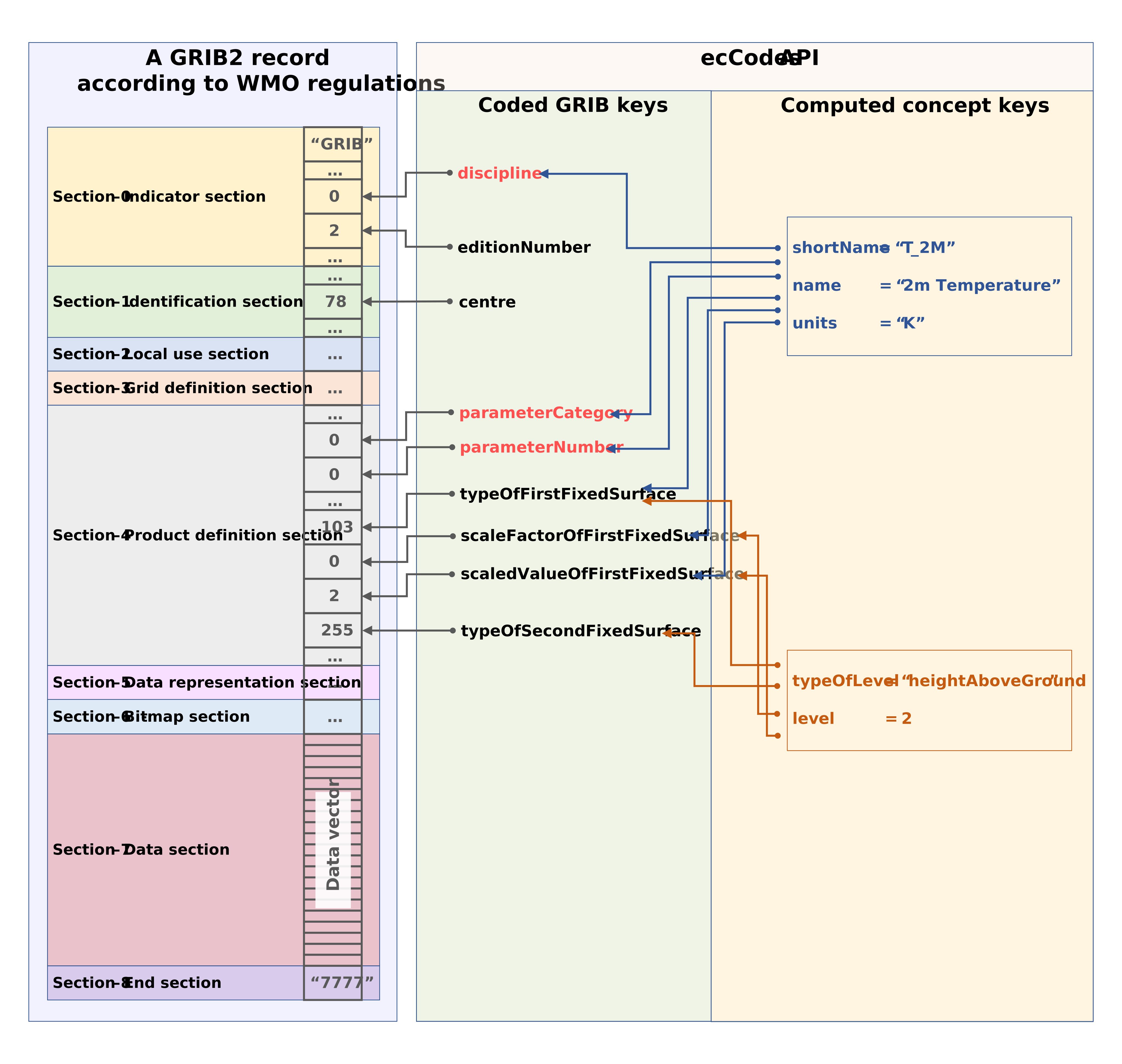
Figure: Left: Simple sketch of a GRIB2 record according to WMO regulations. In this example, the DWD is generator of the record (centre = 78), and its data represent the temperature at 2m above ground. Right: The key-value paradigm of the ecCodes software, with its coded GRIB keys that correspond directly to the metadata elements (such as the discipline) on the one hand, and its computed/derived concept keys (such as the shortName) on the other hand.